Cycle-day reminders versus monthly reminders
See how Every Cycle differs from a monthly reminder, and find your cycle-day event's estimated date in the calendar.
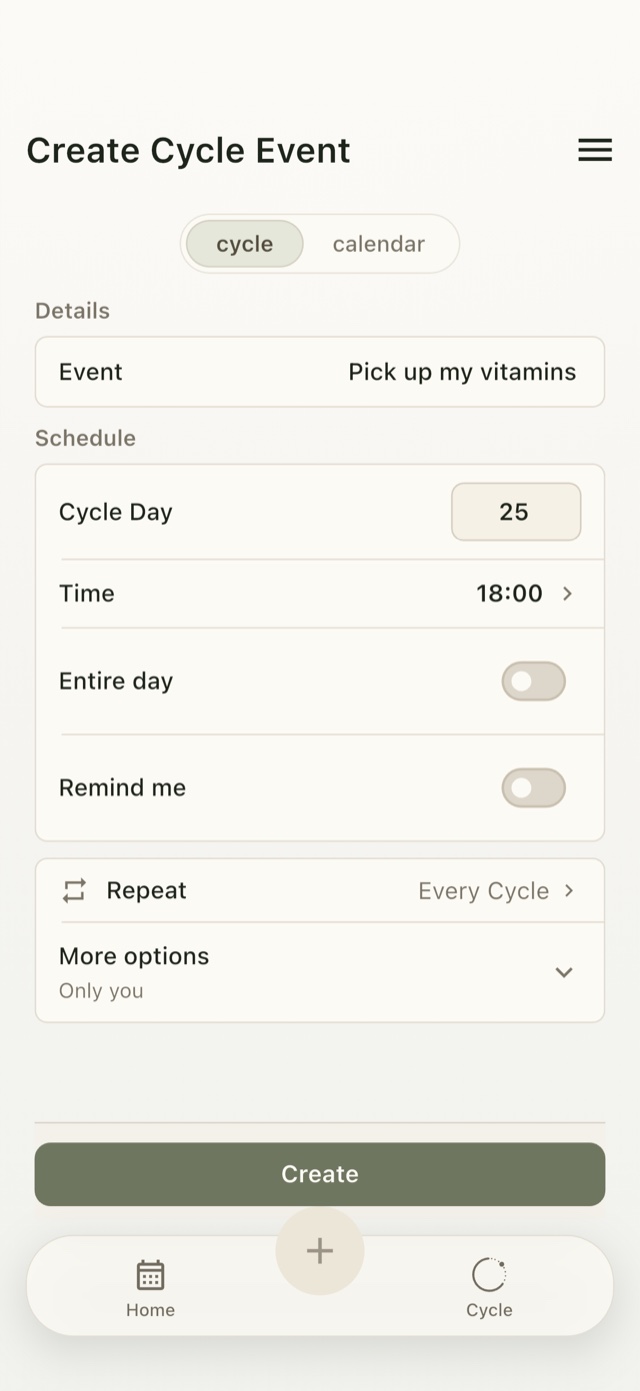
Every Cycle follows a cycle day, not a day of the month
A monthly reminder follows a calendar rule, such as the 25th of each month. In Umorrow, an event set to Cycle Day 25 and Every Cycle appears on the estimated date for that cycle day. Future occurrences appear in the calendar before you record the next cycle start; recording it updates their estimated dates.
Actual Umorrow workflow
- Tap + in the calendar and choose cycle to open Create Cycle Event.
- Enter a concrete action. The example shows Pick up my vitamins.
- Set Cycle Day to 25 and Time to 18:00, as shown in the example.
- Open Repeat and choose Every Cycle. Remind me is a separate, optional notification setting.
- Tap Create and check the event's estimated date in the calendar.
- Record each new cycle start to keep future estimated dates up to date.
Why “every month” is different
The 25th of a month is a fixed calendar date. Cycle Day 25 is counted from the start of a cycle, so it can fall on a different calendar date each time. Every Cycle keeps the event tied to that cycle day.
Choose an action that matters to you
The screenshot uses a personal shopping task, not advice to take vitamins or change a dose. Choose a concrete action you already want to organize around your own cycle. Umorrow does not prescribe which action belongs on a particular cycle day.
When to keep a fixed date instead
If missing the exact date has consequences, keep the event attached to its confirmed date. Cycle context can still appear beside it in the calendar, but the commitment itself should not move with an estimate.
Plan by cycle day or calendar date
Create your Umorrow account to keep your plans in sync across devices. Available for iPhone and Android.